


A Beginner's Guide to Learning an Electric Wind Instrument
Introduction
The world of music is vast and ever-evolving, with new technologies offering exciting opportunities for musicians of all levels. One such innovation is the electric wind instrument (EWI), which brings the expressiveness of traditional wind instruments into the digital age. As a newbie, you might be wondering how to get started with this versatile and futuristic tool. This guide will walk you through the process of choosing your first EWI, setting it up, and learning to play.
Choosing the Right EWI
The first step in your musical journey is selecting an EWI that suits your needs and preferences. Consider the following factors:
1. Familiarity: If you have a background with traditional wind instruments, look for an EWI that mimics the layout and feel of your previous instrument for a smoother transition.
2. Budget: EWIs range from affordable to high-end models. Determine your budget and look for an instrument that offers the best value within your price range.
3. Features: Consider the features that are important to you, such as the number of keys, the presence of octave keys, the type of mouthpiece, and the availability of built-in sounds or external sound module compatibility.
4. Brand Reputation: Research brands known for their quality and reliability in electronic wind instruments, such as Akai, Roland, and Yamaha.
Setting Up Your EWI
Once you've chosen your instrument, it's time to set it up:
1. Read the Manual: Familiarize yourself with the instrument by reading the user manual. Understand the basic functions, controls, and any specific setup instructions.
2. Mouthpiece and Breathing: Adjust the mouthpiece to a comfortable position. Practice breathing techniques to control the airflow and volume.
3. Key Layout: Get acquainted with the key layout and fingering. Start with simple scales and exercises to build muscle memory.
4. Connecting to a Sound Module or DAW: If your EWI doesn't have built-in sounds, you'll need to connect it to a sound module or digital audio workstation (DAW). Learn how to configure the MIDI settings to transmit your performance data effectively.
Learning to Play
Now that your EWI is set up, it's time to learn how to play:
1. Basic Breathing Techniques: Proper breath control is crucial. Practice diaphragmatic breathing and learn how to control the airflow for dynamics and articulation.
2. Finger Exercises: Start with basic finger exercises to improve dexterity and accuracy. Gradually increase the complexity as you become more comfortable.
3. Music Theory: Understanding music theory will help you navigate the EWI's vast sound capabilities. Learn about scales, chords, and harmony to express yourself musically.
4. Practice Regularly: Consistent practice is key to progress. Set aside dedicated practice time each day, focusing on specific skills or pieces of music.
5. Use Learning Resources: Utilize online tutorials, courses, and forums dedicated to EWI. Engage with a community of learners and experienced players for advice and support.
6. Experiment with Sounds: One of the joys of the EWI is its versatility. Experiment with different sounds and effects to find your unique voice.
Maintenance and Care
To keep your EWI in top condition:
1. Clean the Mouthpiece: Regularly clean the mouthpiece with a gentle cleaning solution to maintain hygiene and ensure clear airflow.
2. Store Properly: When not in use, store your EWI in a protective case to prevent damage.
3. Regular Checks: Periodically check for any signs of wear and tear, and replace parts as necessary.
Conclusion
Learning to play an electric wind instrument can be a rewarding and enjoyable experience. With the right instrument, consistent practice, and a willingness to explore, you'll be well on your way to creating beautiful music. Remember, the journey of a thousand miles begins with a single step, so pick up your EWI and let the music begin!
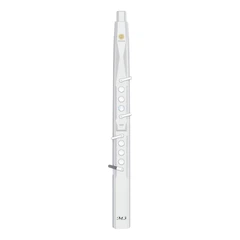
XR3000 Electronic Saxophone EWI Digital Wind Instrument
Brand Name: SUNRISE MELODY
Model: XR3000
Timbre: 60 types
Five octaves metal roller
Bluetooth connection
4 fingering modes available to select
