
Here are some steps to troubleshoot audio glitches in an EWI:
1. Check the Basics
Power Supply: Ensure that the EWI is properly powered. If it uses batteries, make sure they are fresh and inserted correctly. Weak or dying batteries can cause power fluctuations that may lead to audio glitches. If it's powered by an adapter, check the connection and make sure the adapter is working properly.
Connections: Inspect all cables and connections, especially if you are using the EWI with external devices such as a MIDI controller or an amplifier. Loose or damaged cables can cause signal interruptions and glitches. Try reseating or replacing the cables to see if it resolves the issue.
2. Examine the Sound Library and Patches
Built-in Sounds: Test different built-in sound patches on the EWI. If the glitches only occur with certain sounds, it could indicate an issue with those specific patches. The sound data may be corrupted or not optimized properly for the instrument. Try deleting or reloading the problematic sound patches if possible.
Custom Sounds: If you are using custom sound libraries or patches, make sure they are compatible with your EWI model. Some third-party sounds may not work correctly due to differences in format or settings. Try using only the factory default sounds to see if the glitches disappear. If they do, then the custom sounds may be the cause.
3. Sensor Calibration and Key Response
Breath Sensor: Check the calibration of the breath sensor. Incorrect calibration can cause issues with volume and pitch control, which may manifest as glitches in the sound. Refer to the EWI's manual to recalibrate the breath sensor if necessary. Make sure you are blowing into the instrument correctly and with consistent pressure.
Finger Sensors: Test the responsiveness of the finger sensors by pressing each key firmly and observing if there are any delays or double triggering. Clean the keys and the sensor contacts if they seem dirty or sticky. You may also need to adjust the key sensitivity settings in the EWI's menu to ensure accurate note triggering.
4. MIDI Settings and Communication
MIDI Cables and Ports: If you are using MIDI to control external devices or to connect the EWI to a computer, check the MIDI cables for any signs of damage. Try using different MIDI cables and ports to rule out cable or port issues. Make sure the MIDI settings on both the EWI and the connected device are correct and match.
MIDI Latency: Check for MIDI latency, which can cause a delay between when you trigger a sound change and when the actual sound is produced. This delay can make the sound switching seem less smooth and may cause glitches if it's inconsistent. Adjust the MIDI latency settings in your software or device to see if it improves the situation.
5. Firmware and Software Updates
Check for Updates: Visit the manufacturer's website to see if there are any available firmware updates for your EWI. Firmware updates often include bug fixes and performance improvements that can address audio glitches. Follow the instructions provided by the manufacturer to update the firmware carefully.
Software Compatibility: If you are using the EWI with computer software, make sure the software is up to date and compatible with your operating system and the EWI model. Outdated or incompatible software can cause communication problems and glitches. Check the software developer's website for updates and patches.
6. Environmental Factors
Electromagnetic Interference: Move the EWI away from other electronic devices such as computers, routers, or televisions, as they can cause electromagnetic interference. This interference can disrupt the EWI's internal electronics and lead to audio glitches. Try playing the instrument in a different location to see if the problem persists.
Temperature and Humidity: Extreme temperature or humidity levels can affect the performance of the EWI. Make sure the instrument is being used within the recommended temperature and humidity range specified by the manufacturer. If the environment is too hot, cold, or humid, it may cause the components to malfunction or the sound to glitch.
7. Contact Manufacturer or Professional Repair
Manufacturer Support: If you have tried all the above steps and the audio glitches still persist, contact the manufacturer's customer support. Provide them with detailed information about the problem, including when the glitches occur, what sounds or actions trigger them, and any error messages or unusual behaviors you have noticed. They may be able to provide further troubleshooting steps or offer a solution based on the specific model of your EWI.
Professional Repair: If you suspect that there is a hardware issue with the EWI that is causing the audio glitches, consider taking it to a professional musical instrument repair technician who is familiar with electronic wind instruments. They can perform a more in-depth inspection and diagnosis of the instrument to identify and repair any internal component problems.
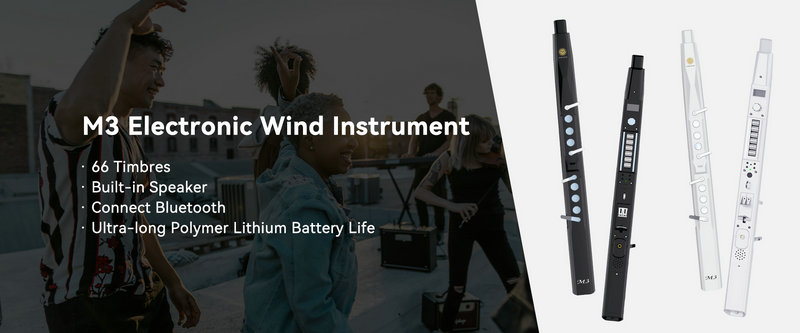
SUNRISE MELODY M3 Electronic Wind Instrument - The best-selling Electronic Wind Instrument
. 66 Timbres
. Built-in Speaker
. Connect Bluetooth
. Ultra-long Polymer Lithium Battery Life