

When switching EWI sounds, several common factors can lead to audio glitches:
1. Hardware Limitations
Processor Overload: The EWI's internal processor may not be powerful enough to handle the rapid loading and initialization of different sound patches in quick succession. When you switch sounds frequently, the processor has to perform multiple tasks simultaneously, such as reading data from the memory, adjusting various sound parameters, and generating the new audio output. If the processor's capacity is exceeded, it can result in audio glitches like pops, clicks, or momentary interruptions in the sound.
Insufficient Memory: Each sound patch requires a certain amount of memory to store and access its associated data, including waveforms, envelopes, and other parameters. If the EWI has limited memory and you switch to a sound patch that requires more memory than is currently available, it can cause problems. The instrument may struggle to load the new sound completely, leading to glitches or incorrect sound playback.
2. Sound Library and Patch Complexity
Poorly Optimized Sound Libraries: The quality and optimization of the sound libraries used by the EWI can significantly impact sound switching. If the sound libraries are not properly designed or contain errors, they may cause issues when switching between sounds. For example, some sound patches may have incorrect or inconsistent parameter settings, which can result in glitches or unexpected changes in the sound during the switching process.
Complex Sound Patches: Sounds that are highly complex, with multiple layers, effects, or modulations, can be more challenging for the EWI to handle during switching. These complex patches require more processing power and memory to load and initialize, increasing the likelihood of glitches. Additionally, the interaction between different elements within a complex sound patch may not be properly synchronized during the switch, leading to audible artifacts or disruptions in the sound.
3. MIDI and Communication Issues
MIDI Signal Interruptions: If you are using the EWI in conjunction with other MIDI devices, such as a synthesizer or a computer music software, interruptions or errors in the MIDI signal can cause audio glitches during sound switching. MIDI cables may be loose, damaged, or subject to interference, which can result in incomplete or incorrect transmission of the sound change commands. This can lead to the EWI receiving incorrect or partial information about the new sound, resulting in glitches or incorrect sound output.
MIDI Latency: Even if the MIDI signal is transmitted correctly, there may be latency issues between the EWI and the connected MIDI device. Latency refers to the delay between when a sound change command is sent and when the new sound is actually produced. If the latency is too high, it can cause a noticeable delay between the moment you switch the sound on the EWI and when the corresponding change in the audio output occurs, making the transition seem less smooth and potentially resulting in glitches if the delay is inconsistent.
4. Sensor and Key Response
Sensor Calibration Problems: The EWI's sensors, such as the breath sensor and finger sensors, need to be accurately calibrated to ensure proper sound generation and control. If the sensors are not calibrated correctly, especially when switching to a sound that requires a different level of sensitivity or response, it can lead to glitches. For example, incorrect breath sensor calibration may cause the volume or pitch to be incorrect when you switch to a new sound, resulting in an inconsistent or distorted audio output.
Key Debounce and Lag: The mechanical and electrical components of the EWI's keys may exhibit debounce or lag issues, particularly during rapid sound switching. Debounce refers to the time it takes for the key to stabilize its electrical signal after being pressed, and lag refers to the delay between when the key is pressed and when the corresponding sound change is registered. If these issues are present, it can cause double triggering (where a single key press is registered as multiple notes) or a delay in the sound switching, resulting in glitches or incorrect sound changes.
5. Environmental Factors
Electromagnetic Interference: External electromagnetic fields from sources such as other electronic devices, power lines, or wireless signals can interfere with the EWI's internal electronics. This interference can disrupt the normal operation of the instrument, including the sound switching process, and cause audio glitches. The EWI's sensitive electronics may pick up these unwanted signals, resulting in pops, crackles, or other artifacts in the sound.
Temperature and Humidity: Extreme or fluctuating temperature and humidity levels can affect the performance of the EWI's components. High humidity can cause condensation inside the instrument, potentially damaging the electronics or affecting the sensor performance. Cold temperatures can slow down the response of the batteries or other components, leading to power-related issues and audio glitches. Additionally, rapid changes in temperature or humidity can cause components to expand or contract, which may affect the mechanical stability of the keys and other parts, resulting in inconsistent sound generation or switching problems.
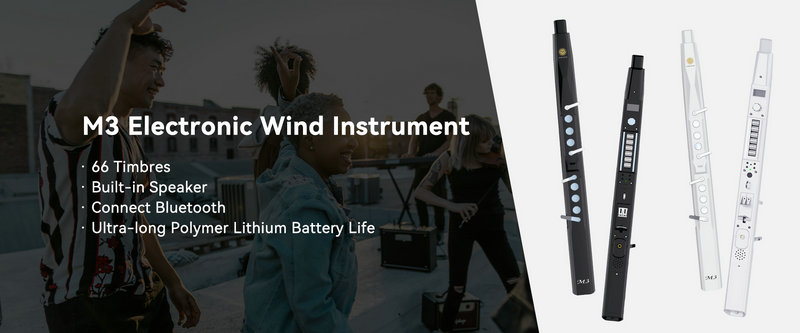
SUNRISE MELODY M3 Electronic Wind Instrument - The best-selling Electronic Wind Instrument
. 66 Timbres
. Built-in Speaker
. Connect Bluetooth
. Ultra-long Polymer Lithium Battery Life