
Comprehensive Guide to Solving the Problem of Connecting Electric Wind Instruments to External Devices
Introduction
Connecting electric wind instruments to external devices is a crucial aspect for musicians looking to expand their sonic capabilities, record their performances, or integrate with other musical elements. However, this process can be fraught with challenges that range from compatibility issues to signal problems. This detailed guide will explore various aspects and offer in - depth solutions to ensure a seamless connection.
Compatibility Checks
Device Compatibility
Research the specifications of both the electric wind instrument and the external device. This includes not only the physical connection types but also the supported protocols. For instance, some older electric wind instruments may only support traditional MIDI, while newer ones might offer USB - C connectivity with additional digital communication capabilities.
Check for firmware updates for both the instrument and the external device. Manufacturers often release updates to improve compatibility, add new features, or fix bugs that could potentially affect the connection process.
Consult user manuals and online forums dedicated to the specific models of the devices. Musicians who have already encountered and solved similar compatibility issues can provide valuable insights.
Signal Types and Conversion
Determine the type of signal generated by the electric wind instrument. If it is a MIDI signal, ensure that the external device has a MIDI input. In case the instrument outputs an analog audio signal, the external device should have an appropriate audio input (such as a 1/4" or 1/8" jack).
In some cases, signal conversion may be necessary. For example, if you want to connect an instrument with a non - standard digital output to a device that only accepts MIDI, you might need a specialized digital - to - MIDI converter. These converters can be expensive but are essential for ensuring compatibility in complex setups.
Cable Selection and Usage
MIDI Cables
When using MIDI cables, ensure that they are of the correct type. Standard MIDI cables have 5 - pin DIN connectors. There are also MIDI - over - USB cables that combine the functionality of a MIDI cable with a USB connection for added flexibility.
Pay attention to the quality of the cable. Cheaper cables may have poor shielding, leading to signal interference. Look for cables with a good reputation for reliability and signal integrity.
Length is also a consideration. While longer cables can be convenient, they are more prone to signal degradation. Try to use the shortest cable length that meets your setup requirements.
USB Cables
For USB connections, make sure to use cables that are compatible with the USB version supported by the device. USB 2.0 and USB 3.0 cables have different data transfer rates and power capabilities.
Check if the cable is capable of data transfer as well as providing power (if required). Some USB cables are designed only for charging and will not work for connecting musical instruments.
As with MIDI cables, avoid using cheap, low - quality USB cables that may cause connection problems or data loss.
Audio Cables
If connecting via analog audio, choose the correct type of audio cable based on the output and input jacks. Common types include 1/4" TRS (Tip - Ring - Sleeve) cables for balanced connections and 1/8" mini - jack cables for unbalanced connections.
Balanced cables are preferred in professional setups as they offer better noise rejection. However, they are more expensive than unbalanced cables.
Ensure that the cable is properly inserted into the jacks. A loose connection can result in a weak or intermittent signal.
Device Configuration
Electric Wind Instrument Settings
On the electric wind instrument, navigate through the menu settings to enable the output signal. This might involve selecting between MIDI, audio, or other output options.
Some instruments allow you to customize the MIDI channels or other parameters. Make sure these settings are configured correctly according to the requirements of the external device.
Adjust the volume or gain settings on the instrument. If the output signal is too strong, it can cause distortion in the external device. Conversely, a weak signal may result in a low - volume or inaudible output.
External Device Configuration
In the case of a synthesizer or other sound - generating device, select the appropriate input source. This could be a specific MIDI port, USB input, or audio input depending on the connection type.
Configure the settings related to the received signal. For example, if using a MIDI input, you might need to set the MIDI channel to match the one sent by the electric wind instrument.
On a computer, open the relevant software (such as a digital audio workstation or MIDI sequencer) and select the correct input device from the software's settings. This ensures that the computer is receiving the signal from the instrument.
Driver Installation and Software Setup
Driver Installation
When connecting an electric wind instrument to a computer, it is often necessary to install drivers. These drivers act as a bridge between the device and the operating system, enabling proper communication.
Visit the manufacturer's website and download the latest drivers for your specific model of the instrument. Follow the installation instructions carefully, which may involve restarting the computer after installation.
In some cases, the operating system may already have built - in drivers that support the device. However, it is still recommended to install the manufacturer - provided drivers for optimal performance.
Software Configuration
Many electric wind instruments come with their own dedicated software for sound customization, firmware updates, and other functions. Install this software and explore its features.
If using a digital audio workstation or other music production software, configure the software to recognize the instrument. This may involve setting up MIDI tracks, audio tracks, or using virtual instruments within the software.
Some software allows for advanced mapping of the instrument's controls to software parameters. This can enhance the creative possibilities by enabling real - time control of effects, filters, and other sound - shaping tools.
Troubleshooting Signal Issues
No Signal or Weak Signal
First, check all cable connections. Ensure that the cables are firmly plugged into the correct ports on both the electric wind instrument and the external device.
Try using a different cable of the same type to rule out a faulty cable. Sometimes, cables can develop internal faults that are not visible from the outside.
Check the settings on both the instrument and the external device. Make sure that the output is enabled on the instrument and the input is selected on the device.
Test the instrument with a different external device and vice versa. This can help determine if the problem lies with the instrument or the device.
Interference and Noise
If you are experiencing interference or noise in the signal, check for sources of electromagnetic interference in the vicinity. Move the setup away from power supplies, fluorescent lights, or other electrical devices that can generate interference.
Use shielded cables, especially for MIDI and analog audio connections. Shielding helps to block out external electromagnetic fields and reduce interference.
In some cases, ground loops can cause noise. A ground loop occurs when there are multiple paths for the electrical current to return to the ground. Try using a ground - loop isolator to eliminate this problem.
Advanced Considerations
Multiple Device Setups
In complex setups involving multiple external devices, consider using a MIDI interface or an audio mixer. A MIDI interface allows you to expand the number of MIDI devices that can be connected, while an audio mixer enables you to combine and control multiple audio sources.
When using multiple devices, pay attention to the MIDI channel assignments and audio routing to avoid conflicts and ensure a smooth workflow.
Use a power conditioner to ensure a stable power supply for all the devices. Fluctuations in the power supply can cause glitches and other problems in the performance of the connected devices.
Networked Setups
Some modern electric wind instruments and external devices support network connectivity. This allows for wireless communication and remote control. However, setting up a networked setup can be complex and requires a good understanding of networking concepts.
Ensure that all devices are on the same network and have the correct IP addresses. Configure the network settings in the relevant software or device menus.
Networked setups offer the advantage of flexibility and ease of setup, but they can also be prone to latency issues. Test the latency and make adjustments if necessary to ensure a responsive performance.
Conclusion
Connecting electric wind instruments to external devices is a multi - step process that requires careful attention to detail. By understanding the compatibility requirements, selecting the right cables, configuring the devices properly, installing the necessary drivers and software, and troubleshooting any signal issues, musicians can achieve a seamless and rewarding connection. Whether for live performance, recording, or creative exploration, a successful connection between the electric wind instrument and external devices opens up a world of musical possibilities. With the right approach and a bit of patience, even the most complex setups can be made to work smoothly.
How to choose the right external device for your electric wind instrument?
What are the common signal problems when connecting electric wind instruments to external devices and how to solve them?
Are there any specific considerations when connecting electric wind instruments to digital audio workstations?
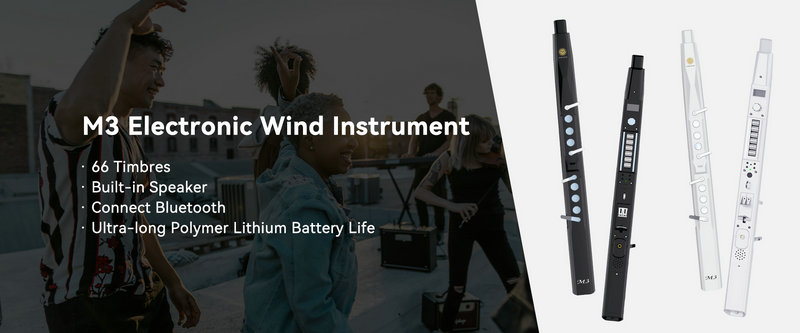
SUNRISE MELODY M3 Electronic Wind Instrument - The best-selling Electronic Wind Instrument
. 66 Timbres
. Built-in Speaker
. Connect Bluetooth
. Ultra-long Polymer Lithium Battery Life