
Here are the steps to diagnose the fault of an electronic wind instrument:
Check Basic Components:
Mouthpiece: Inspect the mouthpiece for any visible damage, cracks, or obstructions. Make sure it is properly attached to the instrument. Try blowing gently into the mouthpiece to see if it triggers any response. If the mouthpiece is removable, try cleaning it and reattaching it to see if that resolves the issue.
Keys and buttons: Press each key and button on the instrument to check for responsiveness. Look for any stuck keys or buttons that may not be functioning properly. If some keys or buttons are not working, it could be a mechanical issue or a problem with the internal circuitry that processes the input from these controls.
Display (if applicable): Check the instrument's display for any error messages or unusual indications. Some electronic wind instruments have a display that can provide information about the instrument's settings, battery life, and any potential faults.
Test Sound Output:
Connect to an amplifier or speaker: Connect the electronic wind instrument to an amplifier or speaker to see if you can hear any sound. If there is no sound, check the volume settings on both the instrument and the amplifier/speaker. Make sure the cables are properly connected and not damaged.
Change settings: Try changing the instrument's settings, such as the volume, tone, or effects. If certain settings are not working or are causing problems, it could indicate a fault in the corresponding part of the instrument.
Test different sounds and octaves: Play different notes and octaves to see if the problem is consistent across all sounds or only affects certain pitches. This can help determine if the issue is related to the sound generation circuitry or a specific part of the instrument's range.
Check Power Supply:
Battery (if applicable): For portable electronic wind instruments, check the battery level. If the battery is low or not charging properly, try charging it with a different charger or replacing the battery. Make sure the battery contacts are clean and free from corrosion.
Power adapter (if applicable): If the instrument uses a power adapter, check that it is properly connected and providing power. Try using a different power adapter if possible to rule out a problem with the adapter itself.
Examine Connectivity:
External devices: If the instrument is designed to connect to external devices such as computers, MIDI controllers, or audio interfaces, check the connections. Make sure the cables are properly plugged in and not damaged. Try connecting and disconnecting the device to see if it triggers any response.
Wireless connections (if applicable): If the instrument has wireless capabilities, such as Bluetooth, check that the connection is active and stable. Try pairing the instrument with a different device to see if the problem persists.
Seek Professional Help:
User manual and online resources: Consult the instrument's user manual for troubleshooting tips and common fault indications. Look for online forums or communities where other users may have experienced similar problems and found solutions.
Contact the manufacturer or a repair technician: If you are unable to diagnose the fault on your own, contact the manufacturer's customer support or a professional repair technician. They can provide more detailed guidance and may be able to repair the instrument if necessary.
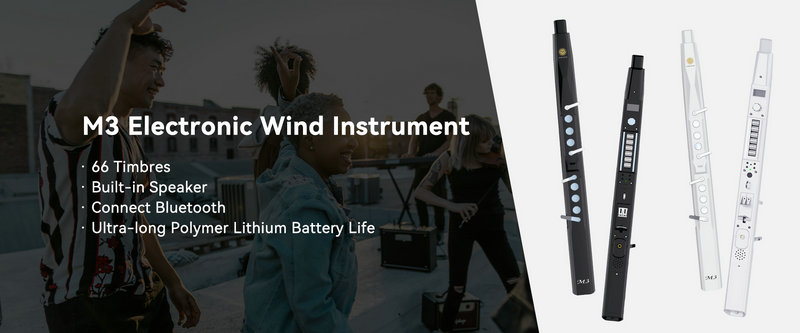
SUNRISE MELODY M3 Electronic Wind Instrument - The best-selling Electronic Wind Instrument
. 66 Timbres
. Built-in Speaker
. Connect Bluetooth
. Ultra-long Polymer Lithium Battery Life