
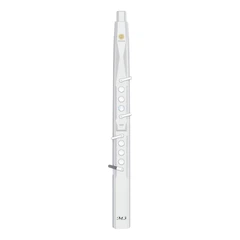


I. Introduction
The digital saxophone is a revolutionary musical instrument that combines the traditional playing style of a saxophone with advanced digital technology. With its ability to produce a wide range of sounds and effects, the digital saxophone offers musicians a new level of creativity and expression. In this comprehensive guide, we will explore the fingering chart for the digital saxophone and provide detailed instructions on how to play this exciting instrument.
II. Understanding the Digital Saxophone
A. What is a Digital Saxophone?
A digital saxophone is an electronic musical instrument that mimics the sound and playing style of a traditional acoustic saxophone. It uses digital signal processing (DSP) technology to generate a wide variety of sounds, including realistic saxophone tones as well as a host of other instrument sounds and effects.
B. Features of the Digital Saxophone
The digital saxophone offers several unique features that set it apart from traditional acoustic saxophones. Some of these features include:
Portability: Digital saxophones are typically much lighter and more portable than acoustic saxophones, making them ideal for musicians on the go.
Sound Variety: With the ability to produce a wide range of sounds and effects, digital saxophones offer musicians a greater degree of creative expression.
MIDI Compatibility: Many digital saxophones are MIDI-compatible, allowing them to be connected to other electronic musical instruments and computer software for even more creative possibilities.
Headphone Output: Digital saxophones often have a headphone output, enabling musicians to practice without disturbing others.
C. Types of Digital Saxophones
There are several types of digital saxophones available on the market, each with its own unique features and capabilities. Some of the most common types include:
Wind Controllers: Wind controllers are digital instruments that are designed to be played like a traditional wind instrument. They use a breath sensor and a set of keys or buttons to control the sound.
Digital Saxophones with Built-in Speakers: These digital saxophones have built-in speakers, making them self-contained and easy to use.
Digital Saxophones with External Amplification: Some digital saxophones require external amplification, such as a speaker or amplifier, to produce sound.
III. The Fingering Chart for Digital Saxophone
A. Basic Fingerings
The basic fingerings for the digital saxophone are similar to those of a traditional acoustic saxophone. Here are the basic fingerings for the most common notes:
Low C: Press down all the keys on the left hand side of the instrument, including the thumb key.
Low D: Press down the first finger of the left hand and the thumb key.
Low E: Press down the first and second fingers of the left hand and the thumb key.
Low F: Press down the first, second, and third fingers of the left hand and the thumb key.
Low G: Press down the first, second, third, and fourth fingers of the left hand and the thumb key.
Low A: Press down the first, second, third, fourth, and fifth fingers of the left hand and the thumb key.
Low B: Press down the first, second, third, fourth, fifth, and sixth fingers of the left hand and the thumb key.
High C: Press down all the keys on the right hand side of the instrument, including the thumb key.
High D: Press down the first finger of the right hand and the thumb key.
High E: Press down the first and second fingers of the right hand and the thumb key.
High F: Press down the first, second, and third fingers of the right hand and the thumb key.
High G: Press down the first, second, third, and fourth fingers of the right hand and the thumb key.
High A: Press down the first, second, third, fourth, and fifth fingers of the right hand and the thumb key.
High B: Press down the first, second, third, fourth, fifth, and sixth fingers of the right hand and the thumb key.
B. Advanced Fingerings
In addition to the basic fingerings, there are several advanced fingerings that can be used on the digital saxophone. These advanced fingerings can be used to play more complex melodies and chords, and to create unique sounds and effects. Here are some of the advanced fingerings for the digital saxophone:
Alternate Fingerings: Alternate fingerings are fingerings that can be used instead of the basic fingerings to produce the same note. Alternate fingerings can be useful for playing passages more easily or for creating different tonal qualities.
Trills: Trills are rapid alternations between two adjacent notes. Trills can be created by using specific fingerings and a rapid movement of the fingers.
Grace Notes: Grace notes are short, ornamental notes that are played before a main note. Grace notes can be added to melodies to create a more expressive and decorative sound.
Slurs: Slurs are smooth transitions between two notes. Slurs can be created by using specific fingerings and a smooth movement of the fingers.
C. Special Fingerings and Techniques
The digital saxophone also offers several special fingerings and techniques that can be used to create unique sounds and effects. Some of these special fingerings and techniques include:
Pitch Bend: Pitch bend is a technique that allows the player to change the pitch of a note by bending the pitch wheel or using a pitch bend controller.
Vibrato: Vibrato is a technique that adds a wavering effect to a note. Vibrato can be created by using a vibrato controller or by moving the jaw or fingers slightly.
Glissando: Glissando is a technique that allows the player to slide smoothly from one note to another. Glissando can be created by using specific fingerings and a smooth movement of the fingers.
Overblowing: Overblowing is a technique that allows the player to produce higher notes by blowing harder into the instrument. Overblowing can be used to create a more powerful and expressive sound.
IV. Practice Tips and Exercises
A. Warm-up Exercises
Before you start practicing specific fingerings or melodies, it is important to warm up your fingers and embouchure. Here are some warm-up exercises that you can do:
Long Tones: Play long, steady notes on each note of the instrument. Focus on producing a clear and consistent sound.
Scales: Play scales up and down the instrument. Start with simple scales, such as the major scale, and gradually work your way up to more complex scales.
Arpeggios: Play arpeggios on the instrument. Arpeggios are broken chords that can help you develop finger dexterity and coordination.
B. Finger Exercises
Once you have warmed up, you can start practicing specific fingerings and exercises to improve your finger dexterity and control. Here are some finger exercises that you can do:
Finger Tapping: Tap each finger on the keys of the instrument in a rhythmic pattern. This exercise can help you develop finger speed and coordination.
Finger Stretches: Stretch your fingers by reaching for the keys on the instrument that are further away from your normal playing position. This exercise can help you increase your finger span and flexibility.
Finger Independence: Practice playing different notes with different fingers on the instrument. This exercise can help you develop finger independence and control.
C. Melody Practice
After you have practiced your fingerings and exercises, you can start practicing melodies on the digital saxophone. Here are some tips for practicing melodies:
Start Slowly: Start by playing the melody slowly and focus on accuracy and intonation. Gradually increase the speed as you become more comfortable with the melody.
Use a Metronome: A metronome can help you keep a steady tempo and improve your rhythm. Start with a slow tempo and gradually increase the speed as you become more confident.
Analyze the Melody: Analyze the melody and identify any difficult passages or fingerings. Practice these passages slowly and gradually build up speed.
Add Expression: Once you have mastered the melody, add expression by using techniques such as vibrato, dynamics, and phrasing.
V. Conclusion
The digital saxophone is a powerful and versatile musical instrument that offers musicians a new level of creativity and expression. By understanding the fingering chart for the digital saxophone and practicing regularly, you can master this exciting instrument and create beautiful music. Whether you are a beginner or an experienced musician, the digital saxophone is sure to inspire and challenge you. So pick up your digital saxophone and start exploring the world of music today!
SUNRISE MELODY M1 Electronic Wind Instrument
. Revisit the passion and dreams of youth
. M1 electric clarinet wind instrument -- The good news for beginners
. Rich and diverse timbres
. Powerful functions and easy operation
. Perfect after-sales service


