
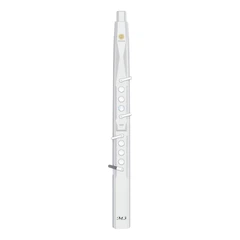


The digital saxophone is a unique musical instrument that combines traditional saxophone playing with digital technology. It offers a wide range of possibilities for music education and creative expression. In this essay, we will explore some practical teaching methods and examples for digital saxophone.
I. Understanding the Digital Saxophone
Before delving into teaching methods, it is essential to have a clear understanding of the digital saxophone. The digital saxophone typically consists of a traditional saxophone body with added digital components such as sensors, processors, and sound modules. These components allow for a variety of features such as sound manipulation, looping, and effects. Familiarize yourself with the instrument's functions and capabilities to better teach students.
II. Basic Playing Techniques
Posture and Embouchure
Just like with a traditional saxophone, proper posture and embouchure are crucial for playing the digital saxophone. Teach students how to hold the instrument correctly, position their body, and form a good embouchure. Demonstrate and provide individual feedback to ensure students are comfortable and able to produce a good sound.
Fingerings and Scales
Start by teaching the basic fingerings and scales on the digital saxophone. Use exercises and drills to help students build muscle memory and improve their dexterity. Incorporate different rhythms and tempos to make the practice more engaging.
Breathing Techniques
Proper breathing is essential for playing any wind instrument. Teach students diaphragmatic breathing techniques to support their playing and improve their tone and endurance. Use breathing exercises and long tones to develop their breath control.
III. Digital Features and Functions
Sound Manipulation
One of the unique aspects of the digital saxophone is its ability to manipulate sound. Teach students how to use the instrument's sound modules to change the tone, pitch, and timbre of their playing. Experiment with different effects such as reverb, delay, and distortion to add depth and texture to their music.
Looping and Layering
Show students how to use the looping function to create repetitive patterns and build complex musical textures. Encourage them to layer different sounds and loops to create unique compositions. Demonstrate how to use the looping function in real-time during performances for added interest.
Connectivity and Recording
Many digital saxophones can be connected to computers or other devices for recording and editing. Teach students how to use this functionality to capture their performances and create digital recordings. Introduce them to music production software to enhance their recordings and add additional elements such as percussion or synthesizers.
IV. Teaching Methods
Individual Instruction
Provide one-on-one instruction to students to address their specific needs and skill levels. This allows for personalized feedback and targeted practice. Use a combination of demonstration, explanation, and hands-on practice to help students improve their playing.
Group Lessons
Group lessons can be a fun and engaging way to teach digital saxophone. Students can learn from each other, collaborate on projects, and perform together. Use group activities such as ensemble playing, improvisation sessions, and composition challenges to foster creativity and teamwork.
Online Resources
Take advantage of online resources such as video tutorials, sheet music, and forums to supplement your teaching. There are many excellent resources available for digital saxophone players, and students can access them at their own pace and convenience. Encourage students to explore these resources and share their findings with the class.
V. Examples and Projects
Composition Assignments
Give students composition assignments to encourage creativity and musical expression. Start with simple tasks such as creating a short melody or riff and gradually build up to more complex compositions. Provide guidelines and prompts to inspire students and help them focus their ideas.
Improvisation Sessions
Hold improvisation sessions where students can freely explore and experiment with the digital saxophone. Set a theme or mood and encourage students to respond musically. This can help develop their improvisational skills and musical intuition.
Collaborative Projects
Organize collaborative projects where students work together to create a musical piece. This could involve combining different instruments, using looping and layering techniques, or creating a multimedia presentation. Collaborative projects can foster teamwork and creativity and give students a sense of accomplishment.
VI. Assessment and Feedback
Performance Assessments
Regularly assess students' playing through performances. Provide constructive feedback on their technique, musicality, and creativity. Use rubrics or checklists to ensure consistent evaluation and help students understand what is expected of them.
Self-Assessment
Encourage students to engage in self-assessment by listening to their own recordings and reflecting on their progress. Provide prompts and questions to guide their self-reflection and help them identify areas for improvement.
Peer Feedback
Incorporate peer feedback into the learning process. Have students listen to each other's performances and provide feedback. This can help students develop their listening skills and gain different perspectives on their playing.
Conclusion
Teaching digital saxophone requires a combination of traditional music education methods and an understanding of digital technology. By using practical teaching methods and providing engaging examples and projects, you can help students unlock the full potential of this unique instrument. Encourage creativity, experimentation, and collaboration to foster a love of music and learning. With patience and dedication, you can guide students on a journey of musical discovery with the digital saxophone.
SUNRISE MELODY M1 Electronic Wind Instrument
. Revisit the passion and dreams of youth
. M1 electric clarinet wind instrument -- The good news for beginners
. Rich and diverse timbres
. Powerful functions and easy operation
. Perfect after-sales service


